This will be an interesting hands-on post on Cassandra DML and DLL. We will see how we perform queries in Cassandra with side to side comparison with queries of SQL databases like MySQL and PostgreSQL. We have been exploring the need of Cassandra, it’s architecture and internal working, this post will take shift gears to a more practical approach and will also try to explore data modeling using Cassandra.
If you’re new to Cassandra, feel free to check out the earlier posts in this series to get up to speed on how it all works.
- Cassandra: Write Fast, Scale Forever
- Cassandra: Internals & Architecture
- Cassandra: Mighty Storage Engine
- Cassandra: Anatomy of Read & Write
The Plan
How will you design a minimal Twitter, Facebook or LinkedIn for a relational database? And how things will change if we try to design it for the Cassandra database instead ofMySQl?
So that’s the plan we will take a simple database design example and we will build it for both MySQL (or PostgreSQL, MariaDB) and Cassandra. I believe this approach is very useful because it will allow us to achieve the following:
- Revision of database design for a relational database.
- Practical Cassandra data modelling knowledge.
- Quick learning through comparisons.
Running Databases Locally
Now we will run both the MySQL and Cassandra databases locally using Docker. For Cassandra, we will spin up a single instance but ideally it needs minimum three node cluster.
1 | docker run -d \ |
The above docker command will spin up a local MySQL instance listening to port 3060. Similarly we will do it for Cassandra.
1 | docker run -d \ |
Note: We can skip port mapping and volumes right now because we do not need to persist the data we are creating.
Getting Inside Docker Containers
To follow the example hands-on sessions we have to get into the running containers (we have already given names to them). Below are the commands to get into the respective database containers:
1 |
|
Additionally, for the MySQL instance we have to login using the root user and the password we assigned to it so that we can give commands to the database.
1 | # from inside the MySQL container |
Similarly for the Cassandra database, we will execute cqlsh which will open the database prompt.
1 | cqlsh |
The Entities
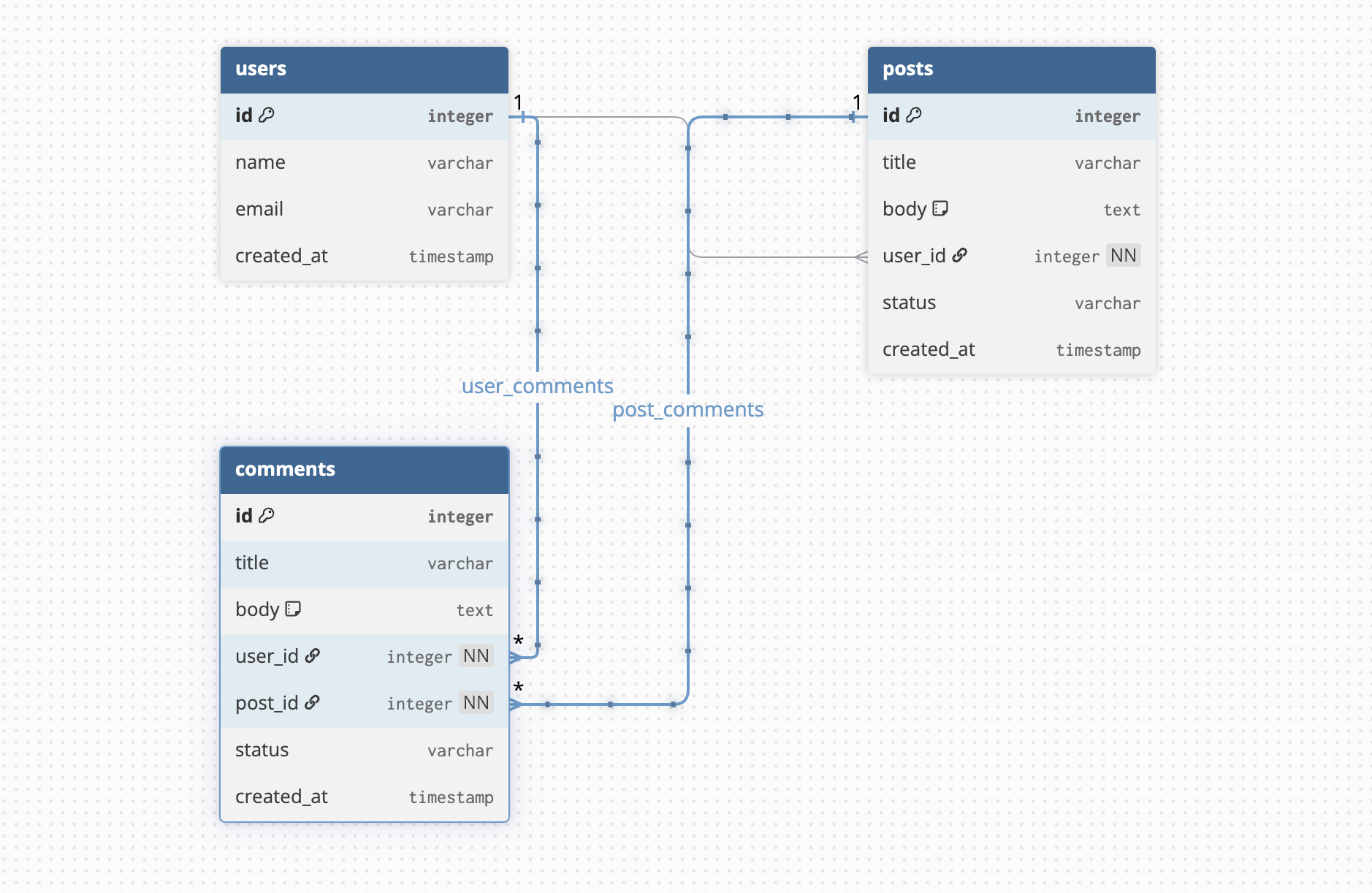
To keep things minimal, we will keep only three tables which will revolve around the entities:
- Users: The applications users
- Posts: The posts created by the users.
- Comments: The comments that are added to the posts by applications users.
Here’s the entity relationship diagram of the above entities.
Databases & Keyspaces
Before creating the entity tables we always create a database to hold the tables in a relational database like MySQL. We have to do the same process for the Cassandra database but with a few differences of syntax and concepts.
MySQL Database
Creating database in MySQL is straightforward:
1 | CREATE DATABASE `social`; |
Cassandra Keyspace
Cassandra is built for BigData and replication of data across regions or data centers are a fundamental requirement for Cassandra. So when we create the Cassandra database (called a KEYSPACE) we have to specify a minimum of two things: The replication strategy and the replication factor.
1 | CREATE KEYSPACE social WITH replication = {'class': 'SimpleStrategy', 'replication_factor': '1'}; |
We can switch to the recently created keyspace using the command similar to MySQL:
1 | USE social; |
Listing Databases
In MySQL we can list the existing databases using the SHOW DATABASES; command however the same will not work in Cassandra. For Cassandra we use the command DESCRIBE KEYSPACES;.
For Cassandra, the listing looks like:
1 | cqlsh:social> DESCRIBE KEYSPACES; |
For MySQL, the listing looks like:
1 | mysql> SHOW DATABASES; |
Creating Tables
Now let’s explore the table creation process and here’s where we will see some of the striking differences between the SQL and CQL ways of doing things.
MySQL Tables
In databases like MySQL and PostgreSQL we have various types of keys and constraints that can be applied while table creation and even can be modified after the creation of the tables. In SQL world we have:
- Primary key which uniquely identifies a row.
- Foreign key to define relationships among tables.
- Constraints like
UNIQUE,NOT NULL,CHECK, etc.
The table creation for MySQL looks like:
1 | CREATE TABLE users ( |
The relational data modeliing generally focuses on normalization, constraints and relationships like:
- One user can have many posts:
users 1:N posts - One post can have many comments:
posts 1:N comments - Each comment belongs to one user:
users 1:N comments
Cassandra Tables
Contrary to MySQL where we enjoy flexibility of schema changes (easy to change table structure and constraints), in Cassandra we have to follow query first table design principle.
Designing tables in Cassandra is a data modeling exercise driven by queries, not normalization. Trying to port a MySQL schema directly to Cassandra usually leads to poor performance.
Query First Design
Before Cassandra tables, we must list queries. Cassandra tables will exist only to support these queries. Let’s see what all we want to fetch:
- Get a user profile by
user_id. - Get posts by a user, latest first.
- Get a post by
post_id. - Get comments for a post, latest first
- Get recent posts for feed
Based on the query patterns above, we have to evaluate the cardinality. Cardinality is the number of distinct values in an index (for MySQL) or column (for Cassandra).
If we cannot list queries, then it’s better to stop here else Cassandra will fail us later.
PRIMARY KEY
Unlike the PRIMARY KEY of MySQL which uniquely identifies and row forcing unique data and avoiding nulls, the Cassandra primary key is a combination of a partition key and a clustering column.
- Partition Key in Cassandra determines which node stores the data and controls data distribution across the cluster of nodes.
- Clustering Columns define sorting order within a partition and allow range queries.
We can skip clustering keys, but only in certain cases. Also, Cassandra, does not have strict hard limit on the number of clustering columns a primary key can have, but there are practical considerations.
Clustering Columns Recommendations
- We should use 1–3 clustering columns for simplicity and performance.
- If there’s more than 5, it is usually a sign of complicated schema.
- We should always design clustering columns based on query patterns, not just for storage.
Let’s have a look at the table creation syntax of CQL.
1 | CREATE TABLE social.users ( |
There’s something new in the syntax which we haven’t discussed. Did you notice that?
WITH CLUSTERING ORDER BY
The WITH CLUSTERING ORDER BY clause is a table option in Cassandra that controls the order in which rows are stored within a partition. Cassandra always stores rows physically sorted by clustering keys and by default, this order is ascending. We can change it to descending (DESC) for each clustering key.
Let’s examine this further. In the posts table, user_id is the partition key, and created_at is the clustering key. So
- All posts of a single user live in the same partition.
WITH CLUSTERING ORDER BY (post_time DESC)ensures the newest posts come first within that partition.
Let’s also see why we do not have it in the users table.
Clustering order only applies if you have a clustering key. The users table’s PRIMARY KEY is just a single column (user_id) and hence each partition has exactly one row, because user_id is unique. There’s nothing to sort within a partition, so WITH CLUSTERING ORDER BY is unnecessary.
I want to highlight somethings radically different from relational database in Cassandra, we should design our tables based on the queries we need, not based on entities or normalization.
One table per query is a core idea in Cassandra data modeling.
There’s not concept of DEFAULT values in Cassandra like we have in SQL.
Inserting Data
Now that we have the tables created, let’s explore how we can insert data into them. Here’ I will skip the SQL in interest of time and directly focus on data insertion in Cassandra.
CQL also used the same insertion command of SQL but there are differences. Let’s see them in action.
Suppose we want to store a row in the users table. The query will look like:
1 | INSERT INTO users (id, name, email, created_at) VALUES (1, 'Ashok Dey', '[email protected]', toTimestamp(now())); |
We will add a few more rows and then we can get the data similar to how we get that in SQL.
1 | SELECT * FROM users; |
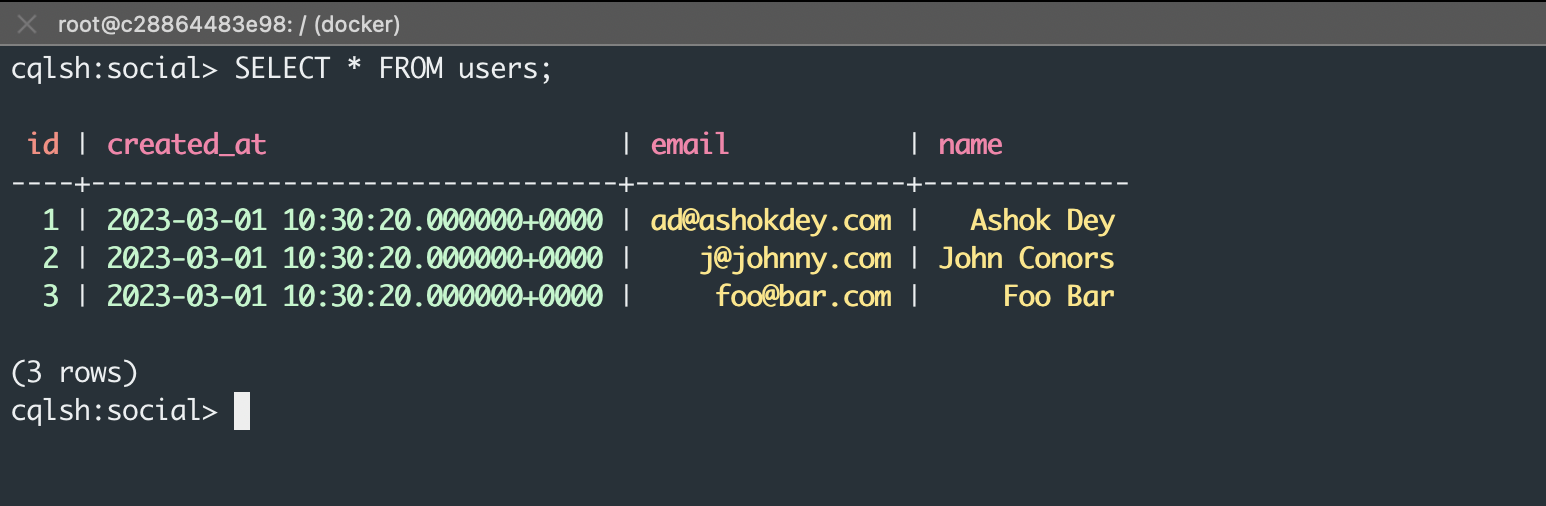
One of the interesting things about Cassandra is that if we try to insert data for an already existing id, it will not complain like SQL (due to primary key validation) but will simply overwrite it. Feel free to try that out.
Cassandra’s
INSERTalways upserts
TRANSACTIONS
In SQL, we can group multiple inserts/updates/delete into one transaction that either commits or rolls back as a whole. While in Cassandra there is no support for multi-statement ACID transactions. Each insert/update is atomic only at the single partition level without global atomicity.
Cassandra offers eventual consistency; it does not support multi-row or multi-table ACID transactions.
Bulk Insertion
Unlike relational databases, Cassandra does not support bulk INSERT statements.
Instead, bulk data is ingested using tools like SSTable loaders, COPY, or application level batching. While Cassandra writes are very fast, bulk loading is handled through specialized mechanisms.
Suppose we have to insert multiple posts in the table posts_by_user table, then we have to fire multiple independent queries to the cqlsh.
1 | INSERT INTO posts_by_user (id, user_id, created_at, title, content) VALUES (1, 1, toTimestamp(now()),'Post 1', 'Content is arbitrary'); |
Duplicate Post ID
If we try these insert statements and then select * from the post table, we will see that Cassandra is allowing duplicate post ids in the table.
1 | INSERT INTO posts_by_user (id, user_id, created_at, title, content) VALUES (1, 1, toTimestamp(now()),'Post 1', 'Content is arbitrary'); |
Now we will execute the SELECT statement.
1 | user_id | created_at | content | id | title |
This is normal Cassandra behavior and it comes down to how our PRIMARY KEY is defined. In Cassandra, only the full PRIMARY KEY must be unique, not individual columns. Uniqueness is defined only by the primary key.
If we need the post id to be unique, instead of INT we can use UUID.
Write Amplification
In Cassandra, creating a post is not a single write operation. The same post may be written to multiple tables to support different queries. For example, a post might be written once to a table that supports fetching posts by user and again to a table that supports the feeds where posts are not fetched by user_id but by time.
This is called write amplification. Cassandra is designed for fast writes, so this tradeoff is acceptable. The benefit is that read queries become extremely fast and predictable because all the data needed is already stored together.
When a user creates a post, we may write to:
posts_by_userposts_by_timecomments_by_post
This is intentional and is the opposite of relational databases, which avoid duplication and rely on joins.
Selecting Data
The MySQL SELECT statement is versatile and flexible. We can query and filter data using any column name that exists in the table. To facilitate fast fetches we employ different types of indexes so that MySQL can return data quickly and effectively.
Cassandra
The Cassandra SELECT statement is query-driven and restrictive. Data can only be efficiently retrieved using the primary key or indexed columns. In Cassandra,
- We must query by primary key or indexed columns.
- Joins don’t exist in Cassandra, instead, we design tables based on query needs.
- Because there’s no joins, we store data multiple times if needed. For example, we might store user’s name in posts table to avoid joining.
1 | -- works in MySQL but will fail in Cassandra |
The above query is a valid query but still it will fail in Cassandra because the id column of the posts_by_users table does not have the id column in the PRIMARY KEY.
1 | cqlsh:social> SELECT * FROM posts_by_user WHERE id = 2; |
So for all the WHERE clause queries in Cassandra we need to add a partition key.
By the way why Cassandra does not allow query via non partition keys? It refuses because it would require full cluster scan which leads to unpredictable performance consequence.
Secondary Indexes
Sometime we may encounter a case where query via a non-partition key becomes crucial. In such scenarios we add a secondary index. A secondary index allows querying a table by a non–primary key column.
1 | CREATE INDEX ON posts_by_user (title); |
Secondary indexes in Cassandra are often misunderstood. They exist, but they are not equivalent to MySQL indexes and must be used very carefully. Indexes in relational databases helps improving query performance but that is not the case in Cassandra. A secondary index creates a hidden table in the node and is not helping in performance improvement of the read statements.
The rule of thumb is that if a query is important, design a table for it. Indexes are a last resort in Cassandra.
Updating Data
In Cassandra, UPDATE and INSERT behave the same way. There is no in-place modification of rows like in relational databases. Every update is treated as a new write with a newer timestamp. Older versions of the data are later cleaned up during compaction. This means updates are fast and cheap, but it also means Cassandra is optimized for immutable writes rather than frequent row modifications.
Important implications:
- Updates do not lock rows.
- Updates do not overwrite data immediately.
- Cassandra favors append-style writes.
Deleting Data
Deletion is almost similar in both SQL and CQL.
If we want to delete the rows of a table in both SQL and CQL we use the TRUNCATE command like:
1 | TRUNCATE users; |
If we wish to delete the full tables we can use:
1 | DROP TABLE users; |
Deleting Databases
The syntax of deleting the database is slightly different.
1 |
|
Tombstones
An important point about Cassandra deletion is that deleting data is fundamentally different from relational databases. When we issue a DELETE statement in Cassandra, the data is not removed immediately from disk. Instead, Cassandra writes a special marker called a tombstone.
This tombstone indicates that the data should be considered deleted, but the actual data remains on disk until a future compaction process permanently removes it.
Mental Shift and More Details
First of all if we are to follow our plan then we will end up with tables per query. here’s the list:
| Query | Cassandra Table |
|---|---|
| Get user by id | users |
| Get posts by user, latest first | posts_by_user |
| Get comments for a post | comments_by_post |
| Get recent posts feed | posts_by_time |
Missing Table
To support a feed (often the latest posts across users), Cassandra needs a separate table designed specifically for that query. This is not optional and cannot be solved with filtering or ordering later because:
- A feed query needs posts ordered by time, not by user.
- Cassandra cannot efficiently scan all users’ posts and sort them.
Therefore, we must pre-store posts already ordered by time. Here’s the posts_by_time table definition:
1 | CREATE TABLE social.posts_by_time ( |
How it works:
- The
bucketgroups posts into manageable partitions such as “2023-03” or “2023-03-01” created_atorders posts within the bucketpost_idensures uniqueness within the same timestamp
Example insert:
1 | INSERT INTO posts_by_time |
Example select:
1 | SELECT * FROM posts_by_time WHERE bucket = '2023-03' LIMIT 20; |
Notice that each query gets its own table. This is the biggest mental shift from SQL, where one table serves many queries.
Auto Delete or TTL
Cassandra supports automatic data expiration using TTL, or Time-To-Live. TTL can be applied at the row level or even at the column level. Once the TTL expires, Cassandra automatically removes the data without requiring manual deletion. This is extremely useful for data such as feeds, sessions, logs, and temporary records. Instead of running cleanup jobs, developers can rely on Cassandra to handle data lifecycle automatically.
Key points to highlight:
- TTL is built into the database.
- Expired data is eventually removed during compaction.
- TTL is ideal for time-based data like insertion in feeds table.
1 | INSERT INTO posts_by_user ( |
1 | UPDATE users |
Common use cases for TTL insert/update are feeds, sessions, logs, etc.
Eventual Consistency
Unlike SQL databases, Cassandra allows consistency to be tuned per query. This means the same data can be read with different consistency guarantees depending on the use case. For example, a read can be very fast but slightly stale, or slower but strongly consistent. Common consistency levels include ONE, QUORUM, and ALL. This flexibility allows applications to balance performance and correctness based on business needs.
1 | CONSISTENCY ONE; |
Consistency levels are:
- ONE retries fastest but may return stale data.
- QUORUM balances between consistency and availability.
- ALL aims for strongest consistency but is the slowest.
Consistency is a choice, not a fixed rule and different queries can use different consistency levels.
Wrap Up
We have coved a considerable amount of Cassandra concepts and I hope you found this helpful.
Cassandra is not suitable for applications that rely heavily on joins, ad-hoc queries, or complex transactions. If an application requires strong ACID guarantees across multiple tables or frequent schema changes, a relational database like PostgreSQL or MySQL is often a better fit.
Cassandra shines when query patterns are well known in advance and the system needs to scale horizontally with predictable performance. The most important shift when moving from SQL to Cassandra is mental, not syntactical.
SQL databases optimize for flexibility and normalization, while Cassandra optimizes for scale and predictable performance. In Cassandra, data is modeled around queries, not entities, tables are duplicated by design, joins are avoided entirely, and writes are cheap.
If these principles are embraced early, Cassandra becomes a powerful and reliable system for large-scale distributed applications.
Points to Remember
- Cassandra favors write-heavy workloads
- Prefer Cassandra for Big Data or continuos write or quickly changing data
- Extra writes simplify reads and reads never require joins
- Updates are append-only but no row-level locks
- Old values are removed later during compaction.
- Both DELETE statements and expired TTL values create tombstones.
There’s still a lot more to explore, but for now, let’s pause here and reflect on what we’ve covered.
Stay healthy, stay blessed!