We have been talking about Protocol Buffers for sometime now and we have also learnt a bit about gRPC when we compared it with REST APIs. Today let’s learn about the basics of gRPC APIs, how to define them, compile them and how to use them in different programming languages like Go and JavaScript.
The previous articles in this series:
Getting Started
gRPC (Google Remote Procedure Call) is a high performance, open-source framework developed by Google for building distributed systems and microservices. It enables communication between applications written in different programming languages, allowing them to communicate with each other over a network in a efficient manner.
Before we dive deep into the gRPC world, I want to re-iterate over some of it features.
- It uses Protobufs as the IDL for writing message and service definitions.
- It uses HTTP/2 for communication, which reduces latency compared to multiple HTTP/1.1 connections.
- It provides a standardized way of handling errors, making it easier to understand and handle failures.
- It can be compiled to a wide variety of languages such as Go, Java, Node, C++, etc.
gRPC Workflow
To get started with gRPC, we will need to know how to do a few things:
- Step 1: We define RPC interface as a service in a
.protofile. - Step 2: We create an implementation of that RPC interface.
- Step 3: We expose the service by creating a gRPC server and registering our service implementation with it.
- Step 4: (optional) We create a gRPC client and connect it to a server.
- Step 5: (optional) We create stubs that use the gRPC client, in most languages stubs are auto generated from the
.protofile. - Step 6: (optional) We use the stub to send RPC requests to the server, this is only needed if acting as a client.
Type of gRPC
In gRPC, there are different types of rpcs that define how the client and server communicate with each other. They are:
- Unary RPC: The simplest and most common type of RPC. In a Unary RPC, the client sends a single request to the server and receives a single response.
- Server Streaming RPC: In a Server Streaming RPC, the client sends a single request to the server and receives a stream of responses. The server can continue to send data as long as it needs to, without the client sending additional requests.
- Client Streaming RPC: In a Client Streaming RPC, the client sends a stream of requests to the server, and the server responds with a single response once it has processed all the requests.
- Bidirectional Streaming RPC: In a Bidirectional Streaming RPC, both the client and the server send a stream of messages to each other. The client and server can send multiple messages back and forth in any order, allowing full-duplex communication.
Definitions
You may notice that there are a few terminologies which are popping up. Let’s explore them in this section.
Client
When we say client, we are referring to the program that is responsible for establishing connections to a server and sending RPC requests to it.
Service
A service is an interface through which clients interact with servers. It is the contract, defining the set of operations and the type of data each operation requires.
Stub
A stub is a client-side object generated from a .proto file that exposes the service’s RPC methods as local functions. When a client calls a method on the stub, the stub uses the gRPC client to serialize the request, send it to the server, and receive the response.
RPC
To put it in simple terms, a Remote Procedure Call enables communication between different systems or services over a network, making it possible for one program to call a function or method that exists on another machine or process.
Now we can proceed further.
Extending Protobuf
Remember the todo.proto file we build and used in the previous blogs? We will extend it and build on it now. We have built a Todo message definition and worked on the Go code that was serializing and deserializing the Protobuf. Let’s re-look into the last definition:
1 | syntax = "proto3"; |
Services
In gRPC, a service defines what operations a server offers and how a client can call them. Services are defined inside the .proto file and act as a contract between the client and the server. Both sides rely on this contract to communicate correctly.
We will extend the .proto file to add the gRPC interface. Remember how we use the CRUD in REST APIs? In the similar way we will create the CRUD for a Todo in gRPC.
We use the service ServiceName block to define a RPC interface (CRUD definitions). let’s do it.
1 | service TodoService { |
As we can see above, for the CRUD, we have defined functions and each function accepts an argument, which is the Request payload defined as a proto message and it returns a Response defined as a proto message. Unlike REST, gRPC does not rely on HTTP verbs (GET, POST, etc.). Instead, the operations are explicitly defined as RPC methods in the service.
Each rpc defines:
- The method name like
CreateTodo. - The request message is the input sent by the client like
CreateTodoRequest. - The response message which is the output returned by the server like
CreateTodoResponse.
Once this service is defined:
- Server side code will implement these methods
- Client side code will use generated stubs to call these methods as if they were local functions.
Req/Res Definitions
Now that we have defined the service and its RPC methods, the next step is to define the request and response messages used by those methods. In gRPC, every RPC call follows a strict contract, the client sends a request message, and the server returns a response message. Let’s define them one by one.
1 | message CreateTodoRequest { |
This is the req/res for the create request. The client sends the data required to create a Todo, and the server responds with the newly created Todo, the id will be auto generated.
1 | message GetTodoRequest { |
This is the req/res for the get by id request. This request fetches a single Todo by its id.
1 | message ListTodosRequest {} |
This is the req/res for the list all request. Even though no input is required, gRPC methods must accept a message type. An empty request also allows us to add fields later such as pagination or filters without breaking the API. This is the reason we are not using google.protobuf.Empty here. The repeated keyword indicates a list of items.
1 | message UpdateTodoRequest { |
This is the req/res for the update request. The optional keyword allows partial updates. If any field is not provided, the server can choose to leave it unchanged.
1 | message DeleteTodoRequest { |
The delete operation does not return any data. Instead, it uses google.protobuf.Empty to indicate a successful operation without a response payload.
Updated Proto File
In the previous sections, we defined the gRPC service and its RPC methods. Now it’s time to put everything together in a complete todo.proto file. This file includes the service definition, request and response messages for each RPC, and the Todo data model with its properties and enum types.
1 | syntax = "proto3"; |
Service Naming Conventions
- Service names are usually PascalCase and describe the resource. Ex -
service TodoService { ... } - RPC method names follow Verb and Resource pattern, PascalCase like:
rpc CreateTodo(CreateTodoRequest) returns (CreateTodoResponse);
Generating gRPC
We use the Protocol Buffer compiler (protoc) with language specific plugins. This process produces client stubs, server interfaces, and message classes for our chosen language.
Go Plugins
We algo need to install the protoc-gen-go-grpc plugin.
1 | # install the grpc go plugin for protoc |
Compilation
Like in the previous blog we compiled the Todo.proto file to get the protobuf auto-generated code, we will now also use the protoc compiler to help us with the auto-generated stubs for the gRPC TodoService we defined.
We will update the Makefile like:
1 | .PHONY: all clean todo user |
Compilation Explained
Let’s focus on the compilation command and break in down to understand what is happening:
1 | protoc -I protos \ |
The above command compiles the Todo.proto file and generates both the message types (--go_out) and gRPC service stubs (--go-grpc_out). Me me explain the flags we have passed to protoc:
-I protos: Specifies the directoryprotos, where the.protofiles are located.--go_out=./generated: Generates Go code for the proto messages and ensures the files are placed relative to the source path.--go_opt=paths=source_relative: Generates Go code for the rpcs and ensures the files are placed relative to the source path.--go-grpc_opt=paths=source_relative: Generates Go code for the gRPC service stubs (client and server interfaces)../protos/todo.protoThe actual.protofile to compile.
Node.js gRPC
If we want to generate the message and the stubs of the gRPC in JavaScript and TypeScript, we can modify the command like:
1 | # js auto-generated code |
Implementing Go gRPC
Now is the time to implement the Go gRPC service. We will write Go code to provide an implementation of our newly generated server interface. In Go, any type that provides methods with the same signatures as the interface implicitly implements that interface.
Quick Summary
Before we go in the full implementation, I want to highlight the things we need to do:
- Server Creation: The code creates a gRPC server that knows how to handle requests.
- Implementing Methods: Writing the logic for the Todo operations or rpc methods we created in the service.
- Creating Listener: The server listens for incoming connections on port XYZ.
- Reflection: The server can tell clients what it can do, like adding, updating, deleting tasks.
- Serve Requests: The server runs in a loop, waiting for clients to ask it to do something.
Installing Dependencies
We need to install the grpc and the reflection packages that our code will depend on. We will do this in the same repo where the code is located.
1 | # grpc package |
Imports
1 | package server |
So we just create a server type that provides the necessary methods in a file named server/server.go with the imports mentioned above.
Server Struct
1 | // the interface of TodoService embedded in our server |
The server struct embeds the pb.UnimplementedTodoServiceServer interface, which is automatically generated from the todo.proto file. This is a skeleton struct that provides default (empty) implementations for all the methods defined in the service.
By embedding UnimplementedTodoServiceServer, we ensure that we don’t have to implement any unimplemented methods manually, as the default behavior is already provided.
Create Todos
1 | func (s *Server) CreateTodo(_ context.Context, req *pb.CreateTodoRequest) (*pb.CreateTodoResponse, error) { |
The CreateTodo method handles incoming requests to create a new Todo. This method is part of the server struct, meaning it is tied to the gRPC service we defined earlier. When a client makes a request to create a Todo, this method is called.
context.Context: Used for managing the request’s lifecycle (e.g., cancellations, timeouts).*pb.CreateTodoRequest: The input message, which contains information about the request. We extract values from this request to create a Todo likePriority: req.GetPriority()*pb.CreateTodoResponse: The response message, which contains the newly created Todo object.
Note: For simplicity we are skipping the error handling in this writing.
The Main Function
We will create a new file main.go at the root and import the server from the file server/server.go.
1 | package main |
The main function is where the actual gRPC server is started and listens for incoming requests.
Creates a Listener: The server needs to listen for incoming network requests on a specific port. In this case, we use
net.Listen("tcp", ":9001")to listen on TCP port 9001. If there is an error in starting the listener, we log the error and stop the program usinglog.Fatalf().Create the gRPC Server: We create a new gRPC server using
grpc.NewServer(). This server is where all the requests are handled. It will process incoming requests according to the methods we define.Register the Service: We register our server with the gRPC server using
pb.RegisterTodoServiceServer(srv, &server{}). This tells the gRPC server that when a client calls one of the methods ofTodoService, it should call the corresponding method in the server struct.Enable Reflection: We call
reflection.Register(srv)to enable reflection on the gRPC server. This is important because reflection allows tools like grpcui to discover the available services and methods exposed by the server. Without reflection, tools likegrpcuiwouldn’t know what services the server provides.Start the Server: The server is started with
srv.Serve(lis), which tells the server to start listening on the network and processing requests. If any error occurs during this process, we log it usinglog.Fatalf().
Once the server starts, it will continue running, listening for incoming requests on port 9001.
Accessing gRPC APIs
Finally we have the implementation of the gRPC API (the CreateTodo rpc). Similarly we can implement the others and now we need to test the API. For this we have multiple options but I will try to keep it simple. We can use any of the following approaches to access the gRPC APIs:
- Postman: Postman, traditionally known for working with REST APIs, now also supports testing gRPC APIs.
- Creating a client: We can write a custom client in the same language as our server or using some other language like (Node.js, Java, C++).
- gRPC UI: This is a powerful tool for interacting with gRPC APIs through a graphical interface. We will select methods, input request data, and view responses in real time. It’s especially useful when you don’t want to manually write code to interact with the server.
Install grpcui
We can install the tool via homebrew in MacOS or we can install the go package as well.
1 | # using homebrew in MacOS |
Using grpcui
We can invoke the tool from the terminal using the host and port of the gRPC server. We will need to add the flag -plaintext so that we can escape the ssl connection with the server.
1 | grpcui -plaintext localhost:9001 |
The tool will give the url in local machine to access the UI.
1 | > grpcui -plaintext localhost:9001 |
Here’s how the UI will look like:
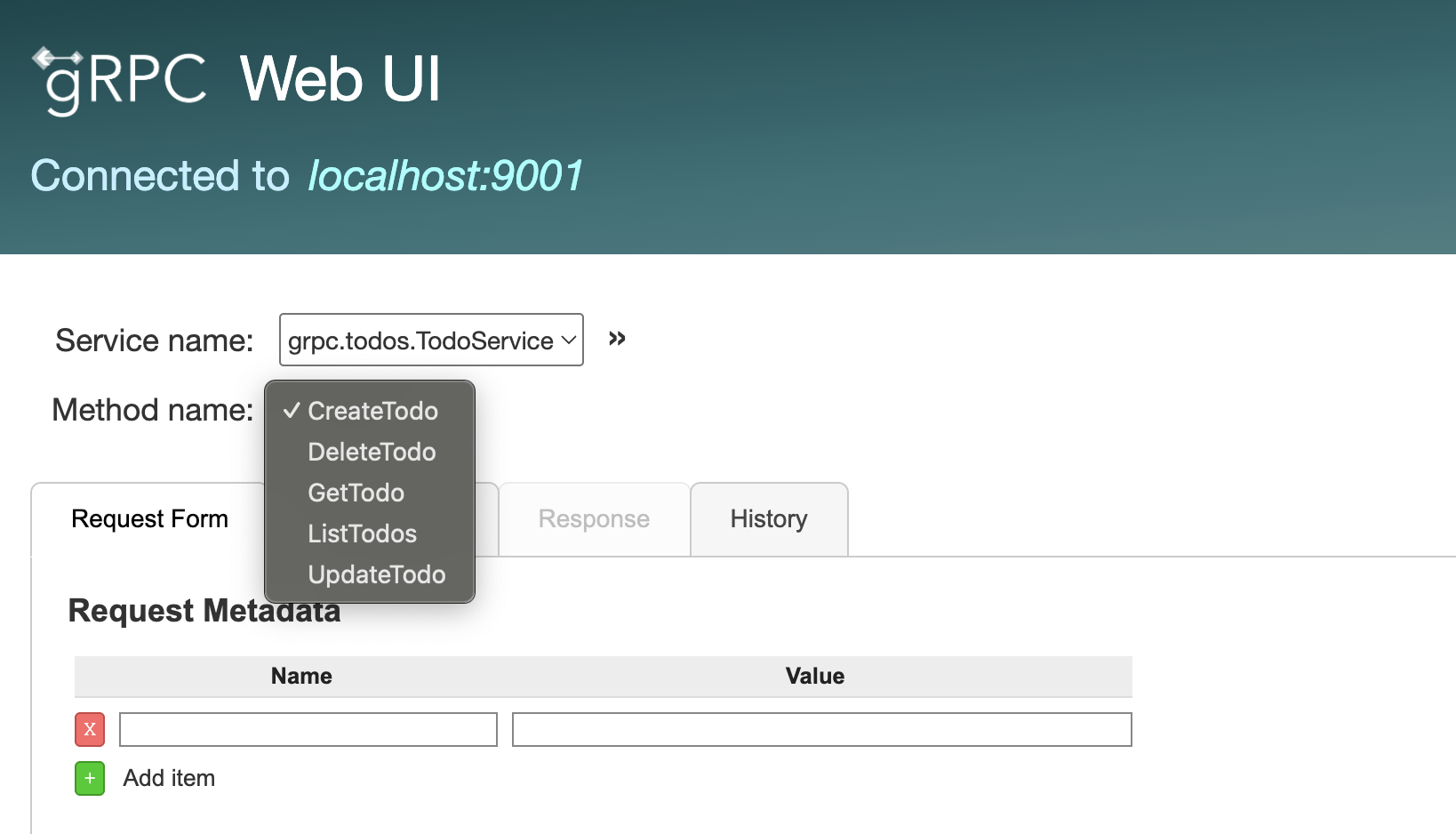
We can select the rpc from the dropdown, currently since we implemented a single rpc, we will have CreateTodo selected.
Invoking gRPC Call
As we can see we have the CreateTodo selected and we have the RequestForm tab. There are other tabs as well beside it like the RawRequest, Response and History. We will use the Request Data section to fill the required details (title and priority of the todo in our case)
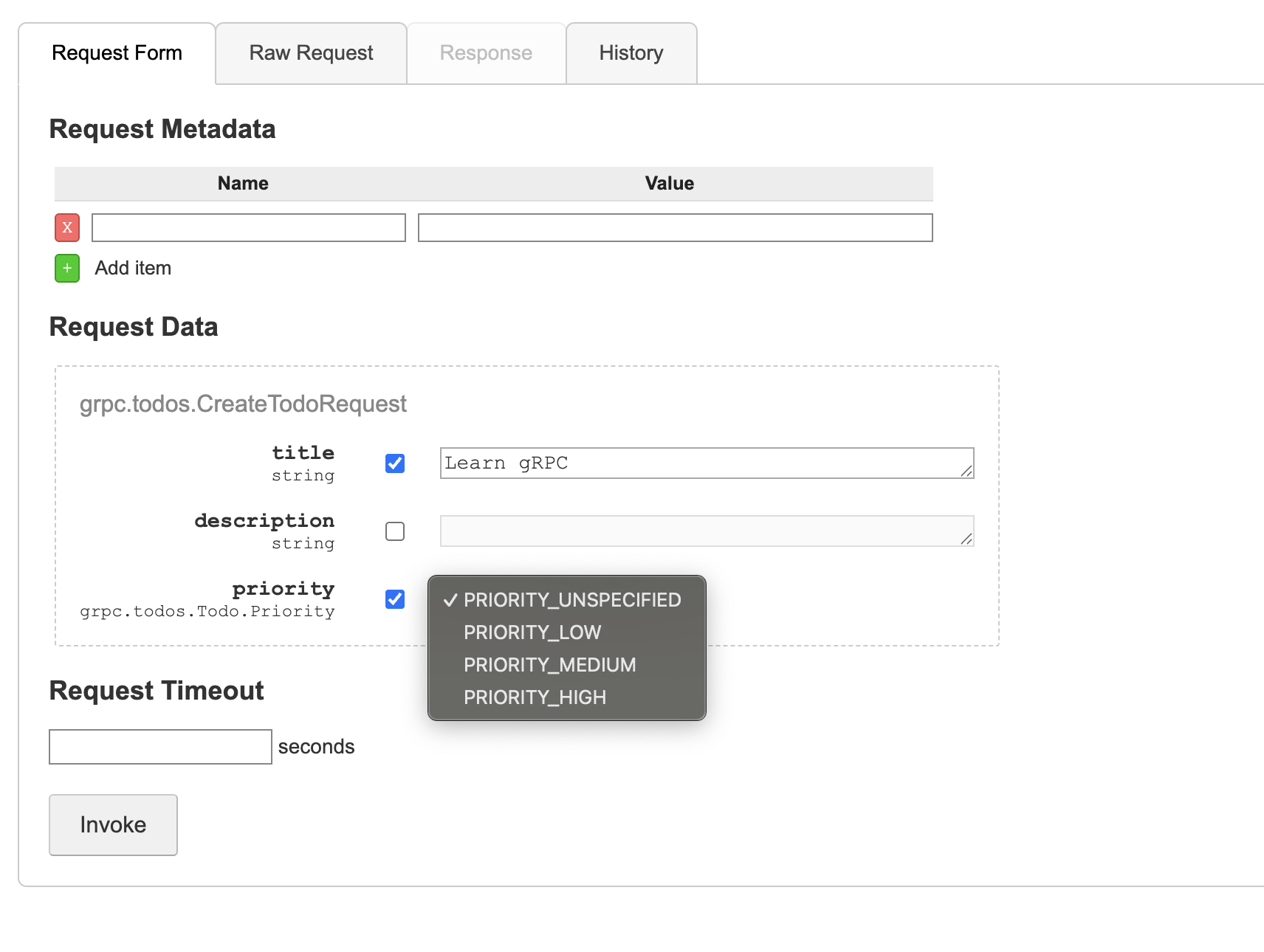
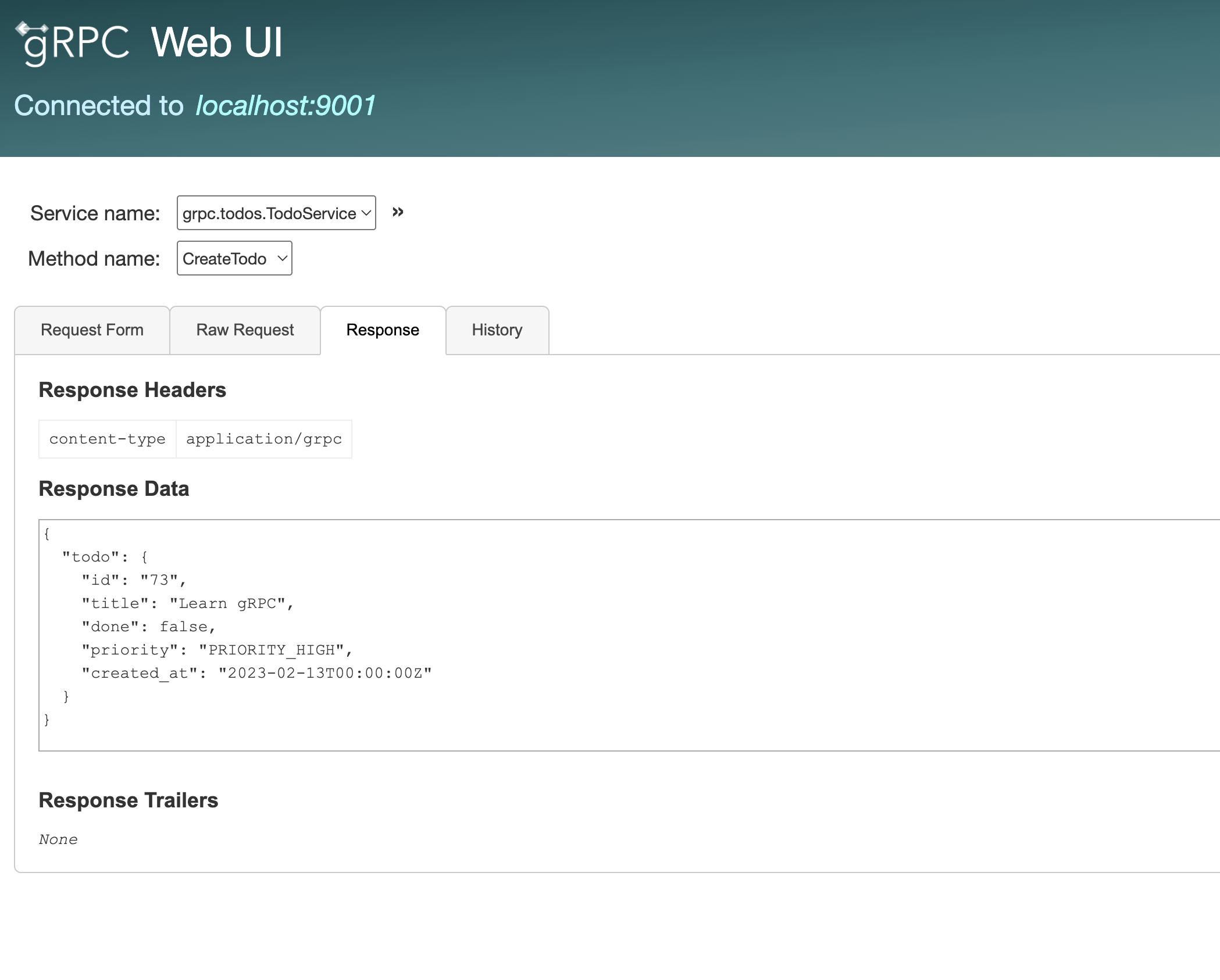
After filling the Request data when we will click on the INVOKE button we can see the response of the gRPC API of the newly created Todo.
Conclusion
This writing has become too long and hence taking a break here will be a wise decision. So far we explored:
- Defining the service rpcs in a protobuf
- Compilation of the protobuf and the Go gRPCs
- Implementing the Go gRPC server
- Using
grpcuito invoke the RPCs
As a part of exercise why not you jump start by completing the rest of the RPCs? Also try to extend the User.proto file.
For the next writing we will try to complete the remaining RPC methods and explore writing a client in a different language. I hope you will find this helpful. Do let me know your feedback/suggestion in the comments section and stay tuned for the upcoming parts.
Stay healthy, stay blessed!